
Conta Contactos
O seu carrinho
Envio por DPD e FedEx
Precisa de ajuda? Pergunte à IA

Acessório para rack QNAP SP-TS-TRAY-WOLOCK

Acessório para rack QNAP SP-TS-TRAY-WOLOCK
30,26 €
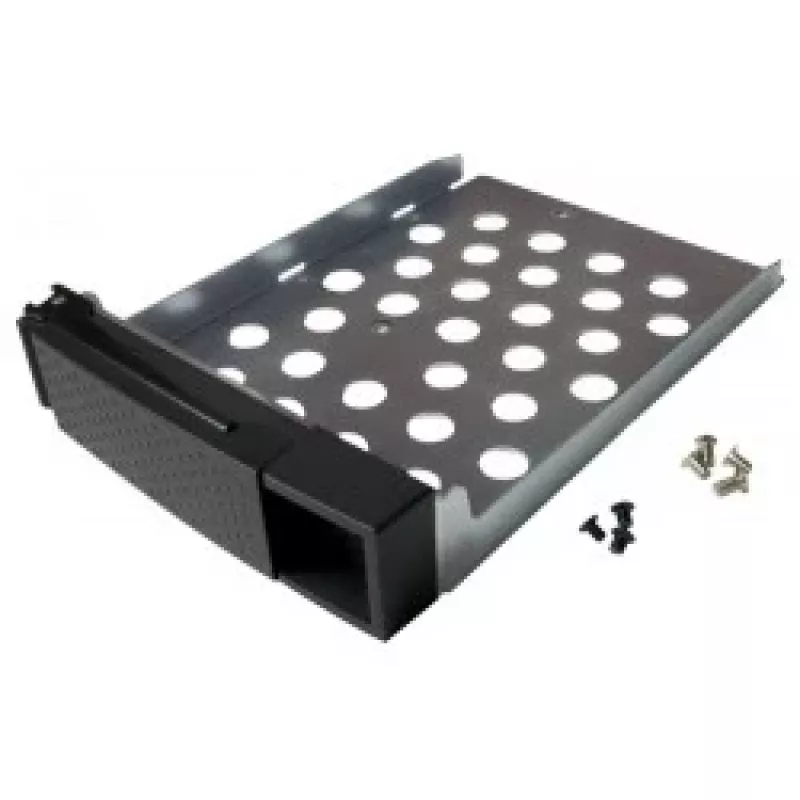
The QNAP SP-TS-TRAY-WOLOCK is a black rack accessory tray designed for use with QNAP TS-119P+, TS-219P+, TS-419P+, and TS-419P II models. It measures 3.5 inches (8.89 cm) in drive size with overall dimensions of 140 mm width and 181 mm depth, and includes mounting screws for both 2.5" and 3.5" hard ... Ler mais
Stock 2 Código 120517 Marca QNAP Modelo SP-TS-TRAY-WOLOCK Garantia 2 anos

Envios e devoluções

Entrega prevista Quinta-feira, Outubro 22
Receberá atualizações através do nosso sistema de seguimento detalhado
Opções de pagamento
Cartão bancárioVisaMastercardPayPalApple PayGoogle PayTransferência bancária

The QNAP SP-TS-TRAY-WOLOCK is a black rack accessory tray designed for use with QNAP TS-119P+, TS-219P+, TS-419P+, and TS-419P II models. It measures 3.5 inches (8.89 cm) in drive size with overall dimensions of 140 mm width and 181 mm depth, and includes mounting screws for both 2.5" and 3.5" hard drives to simplify installation and organization in compatible QNAP enclosures.

Advantages

This tray is finished in black for visual consistency with rack equipment and comes with six black flat-head machine screws for 2.5" HDDs and eight silver flat-head machine screws for 3.5" HDDs. It provides a compact, model-specific mounting solution that fits the listed TS-series QNAP units and helps secure drives reliably within the enclosure.

Suitable for

  • Mounting 2.5" hard drives in QNAP TS-119P+/219P+/419P+/419P II
  • Mounting 3.5" hard drives in QNAP TS-119P+/219P+/419P+/419P II
  • Replacing or organizing drive trays in compatible QNAP network storage units

Key specifications

  • Model: QNAP SP-TS-TRAY-WOLOCK
  • Compatible models: TS-119P+, TS-219P+, TS-419P+, TS-419P II
  • Drive size: 3.5" (8.89 cm)
  • Dimensions: 140 mm (W) x 181 mm (D)
  • Included screws: 6 × black flat-head machine screws for 2.5" HDD, 8 × silver flat-head machine screws for 3.5" HDD
  • Color: Black
  • Brand: QNAP
  • MPN: SP-TS-TRAY-WOLOCK
  • EAN: 4712511121889

How to use

Install the tray into a compatible QNAP TS-series bay according to the NAS service manual. Position the 2.5" or 3.5" drive in the tray, align the screw holes, and secure the drive using the supplied flat-head machine screws (use the black screws for 2.5" drives and the silver screws for 3.5" drives). Slide or fasten the tray into the enclosure until it locks into place as described for your specific QNAP model.

Recommendations

Use the tray only with the listed QNAP TS-119P+/219P+/419P+/419P II models to ensure proper fit; follow the NAS manufacturer’s instructions for drive installation and handling. Keep screws tightened to prevent drive movement but avoid overtightening to prevent damage to drive housings.
Destaques principais
  • Mounting 2.5" hard drives in QNAP TS-119P+/219P+/419P+/419P II
  • Mounting 3.5" hard drives in QNAP TS-119P+/219P+/419P+/419P II
  • Replacing or organizing drive trays in compatible QNAP network storage units
  • Model: QNAP SP-TS-TRAY-WOLOCK
  • Compatible models: TS-119P+, TS-219P+, TS-419P+, TS-419P II
  • Drive size: 3.5" (8.89 cm)
  • Dimensions: 140 mm (W) x 181 mm (D)
  • Included screws: 6 × black flat-head machine screws for 2.5" HDD, 8 × silver flat-head machine screws for 3.5" HDD
  • Color: Black
  • Brand: QNAP
  • MPN: SP-TS-TRAY-WOLOCK
  • EAN: 4712511121889
Especificações
Altura
40 mm
Código do Sistema Harmonizado (HS)
85389099
Compatibilidade
TS-119P+/219P+/419P+/419P II
Cor do produto
Black
Largura
140 mm
Peso
200 g
Profundidade
181 mm
Tamanho (polegadas)
8.89 cm (3.5")

Folheto

Abrir documento
Histórico de preços nos últimos 6 meses
Acessório para rack QNAP SP-TS-TRAY-WOLOCK
Atual
30,26 €
Mais baixo
18,62 €
Mais alto
31,92 €
Variação 24 h
+0,43 €   +1%
Semana
+11,59 €   +62%
Mês
+11,64 €   +63%

Produtos populares nesta categoria

Olá, sou o assistente de IA da DistriNode. Posso ajudá-lo a encontrar produtos, comparar opções, criar orçamentos em PDF ou abrir pedidos de suporte.