
Conta Contactos
O seu carrinho
Envio por DPD e FedEx
Precisa de ajuda? Pergunte à IA

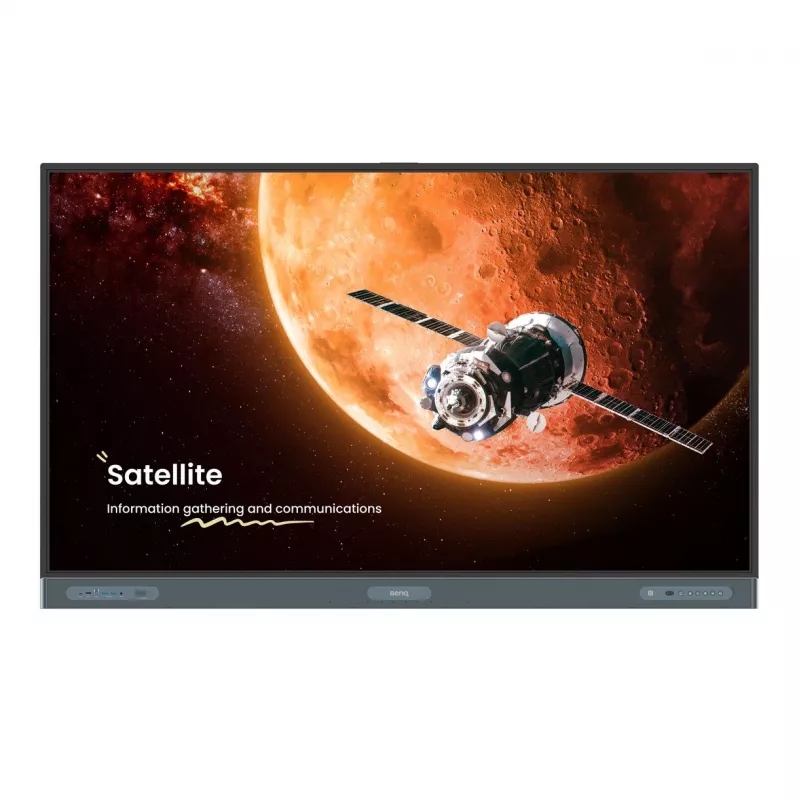
BenQ RP6504 Quadro interativo 165,1 cm (65 polegadas) 3840 x 2160 píxeis ecrã tátil preto

BenQ RP6504 Quadro interativo 165,1 cm (65 polegadas) 3840 x 2160 píxeis ecrã tátil preto
2 644,02 €
Teach in ways you never imaginedDiscover new ways to give lessons and take your teaching to the next level with our most powerful board yet.A very Google experienceThe new EDLA-certified BenQ Board Pro RP04 gives you the best possible classroom experience by combining the power of BenQ software and ... Ler mais
Stock 5 Código 2178339 Marca BENQ Modelo 9H.F97TC.DE1 Garantia 2 anos

Envios e devoluções

Entrega prevista Terça-feira, Outubro 27
Receberá atualizações através do nosso sistema de seguimento detalhado
Opções de pagamento
Cartão bancárioVisaMastercardPayPalApple PayGoogle PayTransferência bancária
Teach in ways you never imagined
Discover new ways to give lessons and take your teaching to the next level with our most powerful board yet.

A very Google experience
The new EDLA-certified BenQ Board Pro RP04 gives you the best possible classroom experience by combining the power of BenQ software and hardware with official Google services for education.

Google Play
Get access to your favorite education apps right on the BenQ Board.

Core services
Google’s Core Services come preinstalled on the RP04.

Collaboration tools
Use any of the Google Docs Editors to open lesson files directly from your board.

Access your files

With Google Drive on the board, you can conveniently open your cloud-based teaching materials and then save them back to your drive once class is done.

Experience enhanced security
Google Play Protect safeguards your displays and prevents you from installing potentially harmful apps and malware.

Hey Google…

Get a helping hand while teaching by speaking to Google Assistant from your remote.

Rely on efficient long-term performance
The RP04 runs Android 13 on an 8-core Pro chipset ensuring its futureproof use and consistently fast performance.

An unlimited canvas
EZWrite is a powerful whiteboard with a collection of tools designed for more engaging lessons. It lets students get their hands on the board whether you’re teaching in person or online.

No ordinary whiteboard
EZWrite 6 lets you do more than just write and draw. You can expand the size of your canvas, split it into sections, pull up templates and measuring tools, and even share your live camera feed.

Import. Edit. Share.
EZWrite supports Office files so you can import slideshows, documents, sheets, or PDFs and use them to teach. Add notes during class, and save your session as an editable IWB file or export it as a PDF handout for your students.

Borderless classrooms
Activating cloud whiteboarding extends your session to remote students, wherever they may be. They can write and participate freely as if they were right in front of the board.

AI tools for accessibility and inclusivity
Text-to-speech
Have written text read aloud for everyone in class.

Multilingual translation
Translate resources to different languages and access a world of content.

OCR
Convert text from images and documents to an editable format.

An ideal teaching environment
The RP04 comes out of the box with everything you need to give effective and engaging lessons.

Your secure, exclusive space
Each user gets secure access to their own personalised teaching space on the board, preventing others from compromising their data.

Personalise your board
Customise your teaching space by adding shortcuts, apps, and widgets on your home screen for convenient access.

Log in your way
Save time by logging in to the RP04 with a simple tap of your NFC card or by scanning the QR code with your phone. Access your cloud storage and load personal settings on any BenQ Board Pro easily and securely.

Annotate anywhere
The built-in Floating Tool lets you write on top of any app, website, document, image, or content on the board or from connected devices.

Shortcuts on the side
Accessible with just a tap, the sidebar gives you quick access to the Home screen, input sources, EZWrite, and all your most-used apps.

Bigger, better search
Whether it’s a webpage or the lessons files stored in your cloud, the expanded BenQ Search helps you locate content with ease.

Double your efficiency
The split-screen mode lets you teach more efficiently as it allows you to use two apps side by side. You can whiteboard on the left while browsing other resources on the right.

Convenient connectivity
The RP04 has multiple ports at the front for convenient connectivity. It also features a 100W USB-C port that lets you display screens, charge devices, and enable touchback.

Immersive sound
Experience unmatched audio with the board’s two powerful 20-watt front-facing speakers and 16-watt subwoofer.

Clear audio pickup
The RP04’s 8-microphone array with echo cancellation and noise reduction ensures that you’re heard loud and clear.

A better writing experience
The BenQ Board Pro encourages students to work together by providing a wide interactive space that offers lag-free touch response and a natural writing experience.

Made for collaboration
The RP04 has up to 50 touch points, allowing multiple users to interact simultaneously.

Like writing on paper
Having no gap in between the glass and the panel ensures smoother writing.

Truly responsive touch
With Fine Ultra Precision IR, you get more accurate writing and interaction with the screen.

AI-enhanced streaming and recording
Capture classes on high-quality video by plugging in the DV01K BenQ Board camera. Its AI features—such as auto framing, active noise cancellation, and face and voice tracking—ensure a clear and dynamic video feed that is ideal for streaming and recording.

AI-powered auto framing
AI-powered speaker tracking
Active noise cancellation


An easier way to share
You don’t need wires to present content. With InstaShare 2, teachers and students can wirelessly cast their laptop and tablet screens to the BenQ Board from wherever they are in the room.

Control devices from the board
Simultaneously share screens
Cast your board to other screens


Share different types of content
Make group presentations and whole-class discussions more engaging for everyone. Teachers and students alike can share photos, videos, or even their camera feed.

Tap and share
Share your screen from your Android phone with a simple tap. Just place your phone on the board's NFC sensor and instantly start sharing.

Manage the session
InstaShare 2 lets you select which screens to hide or share, instantly turn off screen sharing requests, and automatically block inappropriate content with AI.

Streamlined management
The BenQ ecosystem makes managing devices, apps, and user accounts simpler than ever to reduce the workload of IT and admin staff.

Import and sync existing users
Streamline account management by importing users directly from Google Workspace, Microsoft Entra ID (formerly Azure Active Directory), ClassLink, LDAP servers, or other SAML-based identity providers.

Manage everything remotely
Since BenQ’s management platforms are all cloud-based, admins can easily push firmware updates, install apps, and set policies for multiple BenQ Boards wherever they may be.

Get better data security
With single sign-on, MFA, authentication mode, and app scanning via Google Play Protect, the BenQ Board gives you extra layers of protection.

Receive detailed analytics
Get advanced analytics for BenQ Board operation and app usage. Generate more informative reports by selecting specific devices and data points.

Communicate across campus
Send scheduled or real-time announcements for events and emergencies through multiple BenQ displays with X-Sign Broadcast.

ClassroomCare®
Designed for healthier classrooms

The BenQ Board Pro is equipped with the maximum level of ClassroomCare® protection so educators can teach with confidence while their students interact safely.

Only the best for your eyes
The RP04 is the first Eyesafe® Certified 2.0 smart board with an RPF®50 rating. It offers the highest level of protection available for the eyes. The display prevents eye strain by greatly reducing high-energy blue light while maintaining the screen’s vivid colors.

Eyesafe® Certified 2.0
TÜV certified
Flicker-free
Anti-glare


Stop the spread of germs
Minimize surface transmission with germ-resistant technologies. The RP04’s touchscreen, buttons, and front ports are made with a proprietary TÜV-certified formula that is 99.9% effective against common germs.

Extended protection
Shared surfaces can easily become vectors of germs in the classroom. The RP04’s pens and remote control have been made germ-resistant for extended protection.

Protect indoor air quality
Poor indoor air quality negatively affects student health and performance. The BenQ Board Pro helps monitor CO₂, PM₂.₅, and TVOC levels in the classroom so you can regulate air flow accordingly.

Air ioniser
The BenQ Board Pro is the only smart board with an air ioniser that helps regulate impurities when pollutant levels rise.

IP5X dust protection
The RP04 panel complies with IEC standard 60529 to ensure consistent operation, even in dust-prone classroom environments.

Save Energy with BenQ Boards
BenQ Boards offer power-saving features to monitor and reduce energy consumption, save costs, and improve sustainability without compromising performance.

BenQ RP6504. Display diagonal: 165.1 cm (65"), Working area: 1428.5 x 803.5 mm, Display brightness: 450 cd/m². Operating system installed: Android, Processor architecture: ARM Cortex A78 + ARM Cortex A55, User memory: 64 GB. Speaker power: 20 W, Subwoofer RMS power: 16 W. Ethernet LAN data rates: 10,100,1000 Mbit/s. USB connector type: USB Type-A, USB Type-B, USB Type-C, DisplayPort version: 1.2a, Microphone connectivity: 3.5 mm

How to use

Turn on the display and sign in to your personal teaching space using NFC, QR code scan, or your standard account credentials to load your cloud settings. Open EZWrite or any Google Docs Editors app to import lesson files from Google Drive, edit and annotate on the interactive canvas, then save the session as an editable IWB file or export a PDF for students. Use the sidebar and Floating Tool to access shortcuts, input sources and annotate over any app or content. For wireless presentations, use InstaShare 2 or tap an Android phone to the NFC sensor to cast screens instantly. For recording or streaming, connect the optional DV01K BenQ camera and use the board’s AI features to enhance framing and audio clarity.

Recommendations

For regular classroom use, keep firmware and apps updated via BenQ’s cloud management tools, enable Google Play Protect for app security, and use the germ-resistant pens and remote. Monitor classroom air quality readings and use the integrated air ioniser when pollutant levels rise. When hosting hybrid sessions, enable cloud whiteboarding so remote students can write and participate in real time.

Destaques principais
  • Classroom teaching and interactive lessons
  • Hybrid learning with remote student collaboration
  • Workshops and group brainstorming sessions
  • Corporate meetings and presentations
  • Recording and streaming lessons with an external BenQ camera
  • Display diagonal: 65"
  • Resolution: 3840 x 2160 (4K Ultra HD)
  • Brightness: 450 cd/m²
  • Panel type: IPS
  • Processor: 8-core Android Pro chipset (Android 13)
  • Memory (user): 64 GB
  • Touch points: up to 50
  • Response time: 8 ms
  • Speakers: 2×20 W front + 16 W subwoofer
  • Microphones: 8-microphone array with echo cancellation and noise reduction
  • Front ports: including 100W USB-C (display, charge, touchback)
  • Connectivity: USB-A, USB-B, USB-C, DisplayPort 1.2a
  • Weight: 41 kg
  • Color: Black
  • Certifications/Features: Google EDLA-certified, Eyesafe® Certified 2.0, TÜV certified, IP5X dust protection, ClassroomCare® germ-resistant surfaces
Especificações
Altifalantes incorporados
Yes
Altura
937.6 mm
Altura da embalagem
1020 mm
Apto para montagem na parede
Yes
Área de trabalho
1428.5 x 803.5 mm
Arquitetura do processador
ARM Cortex A78 + ARM Cortex A55
Bandeja para caneta incluída
Yes
Bluetooth
Yes
Brilho do ecrã
450 cd/m²
Cabos incluídos
HDMI, Power, USB, USB Type-C, VGA
Caneta incluída
Yes
Capacidade de RAM
8 GB
Código pautal (TARIC)
8528521000
Comunicação de campo próximo (NFC)
Yes
Conectividade do microfone
3.5 mm
Conectividade dos auscultadores
3.5 mm
Consumo de energia (em espera)
0.5 W
Consumo de energia (típico)
95 W
Cor do produto
Black
Data de fim das atualizações de segurança
30/11/2026
Diagonal do ecrã
165.1 cm (65")
Dureza
9H
Ecrã antirreflexo
Yes
Ecrã tátil
Yes
Entrada de linha
Yes
Ethernet LAN
Yes
Família de placas gráficas
ARM
Frequência de entrada CA
50/60 Hz
Gama de cores
72%
Humidade relativa de armazenamento (H-H)
10 - 90%
Humidade relativa de funcionamento (H-H)
10 - 90%
Interface de montagem do painel
600 x 400 mm
Kit de montagem
Yes
Largura
1488.4 mm
Largura da embalagem
210 mm
Material da superfície
Tempered glass
Memória do utilizador
64 GB
Microfone incorporado
Yes
Montagem VESA
Yes
N. portas USB 3.2 Gen 1 (3.1 Gen 1) tipo B módulo de interface
3
Núcleos do processador
4
Número de altifalantes incorporados
2
Número de canetas stylus
2
Número de ionizadores de ar
1
Número de pontos de toque simultâneos
50
Número de portas DisplayPort
1
Número de portas HDMI
5
Número de portas táteis USB 2.0 tipo B
3
Número de portas USB 2.0
1
Número de portas USB 3.2 Gen 1 (3.1 Gen 1) tipo A
7
Número de portas USB tipo C
4
Número de portas VGA (D-Sub)
1
Número de saídas HDMI
1
País de origem
China
Peso
41 kg
Peso da embalagem
48 kg
Placa gráfica
Mali-G57 MC5
Porta de saída S/PDIF
Yes
Portas Ethernet LAN (RJ-45)
1
Potência do altifalante
20 W
Potência RMS do subwoofer
16 W
Processador integrado
Yes
Produtos por palete
5 pc(s)
Profundidade
117.7 mm
Profundidade da embalagem
1630 mm
Proporção de aspeto nativa
16:9
Quantidade por embalagem
1 pc(s)
Rácio de contraste (dinâmico)
50000:1
Rácio de contraste (típico)
1200:1
Ranhura OPS
1
Resolução do ecrã
3840 x 2160 pixels
Saída de áudio
3
Saída de linha
Yes
Sensor de humidade
Yes
Sensor de movimento
Yes
Sensor de temperatura
Yes
Sensor PM2.5
Yes
Sistema operativo instalado
Android
Subwoofer integrado
Yes
Tecnologia Low Blue Light
Yes
Tecnologia tátil
Multi-touch
Telecomando incluído
Yes
Temperatura de armazenamento (T-T)
-20 - 60 °C
Temperatura de funcionamento (T-T)
0 - 40 °C
Tempo de resposta
8 ms
Tempo de resposta do sistema tátil
5 ms
Tensão de entrada CA
100-240 V
Tipo de conector USB
USB Type-A, USB Type-B, USB Type-C
Tipo de ecrã tátil
Infrared
Tipo de HD
4K Ultra HD
Tipo de painel
IPS
Velocidades de dados Ethernet LAN
10,100,1000 Mbit/s
Versão de Bluetooth
5.2
Versão DisplayPort
1.2a
Versão do sistema operativo
13
Versão HDMI
2.0
Wi-Fi
Yes

Folheto

Abrir documento
Histórico de preços nos últimos 6 meses
BenQ RP6504 Quadro interativo 165,1 cm (65 polegadas) 3840 x 2160 píxeis ecrã tátil preto
Atual
2 644,02 €
Mais baixo
2 512,00 €
Mais alto
2 644,02 €
Variação 24 h
+122,41 €   +5%
Semana
+117,07 €   +5%
Mês
—   
Olá, sou o assistente de IA da DistriNode. Posso ajudá-lo a encontrar produtos, comparar opções, criar orçamentos em PDF ou abrir pedidos de suporte.