
Conta Contactos
O seu carrinho
Envio por DPD e FedEx
Precisa de ajuda? Pergunte à IA

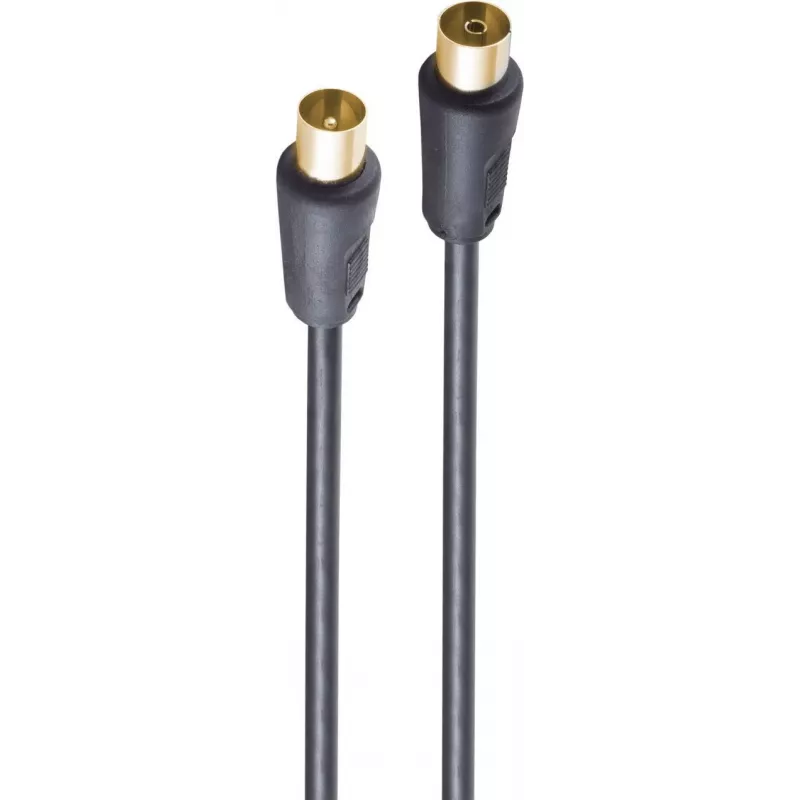
Cabo coaxial ShiverPeaks BS80205-128-GS 5 m IEC preto

Cabo coaxial ShiverPeaks BS80205-128-GS 5 m IEC preto
17,30 €
The ShiverPeaks BS80205-128-GS 5 m IEC Black coaxial cable provides a reliable connection for audio and video equipment. With IEC connectors on both ends and a 5 metre length, this cable is designed to deliver stable signal transmission between televisions, set-top boxes, radios and other compatible... Ler mais
Stock 700 Código 2255277 Marca SHIVERPEAKS Modelo BS80205-128-GS Garantia 2 anos

Envios e devoluções

Entrega prevista Terça-feira, Outubro 27
Receberá atualizações através do nosso sistema de seguimento detalhado
Opções de pagamento
Cartão bancárioVisaMastercardPayPalApple PayGoogle PayTransferência bancária

The ShiverPeaks BS80205-128-GS 5 m IEC Black coaxial cable provides a reliable connection for audio and video equipment. With IEC connectors on both ends and a 5 metre length, this cable is designed to deliver stable signal transmission between televisions, set-top boxes, radios and other compatible devices. The black outer jacket offers a flexible yet durable construction suitable for both home and professional environments.

Advantages

This coaxial cable combines a standard IEC connector format with a moderate length to reduce signal loss and maintain consistent audio/video quality across connected devices. Its flexible black jacket enables easier routing behind furniture or inside AV racks while resisting everyday wear. The cable is suitable for straightforward plug-and-play installation without the need for additional adapters.

Suitable for

  • Connecting a TV to a set-top box or satellite receiver
  • Linking radios and tuners to external antennas
  • Home entertainment system wiring and AV component connections
  • Temporary or permanent in-studio or professional AV setups requiring IEC coax

Key specifications

  • Cable type: coaxial
  • Connector type: IEC connector on both ends
  • Length: 5 m
  • Colour: black outer jacket
  • Application: audio and video signal transmission

How to use

Ensure both devices are powered off before connecting the coaxial cable. Align the IEC connectors with the corresponding input and output sockets and push them in firmly until seated. After connections are made, power on devices and verify signal reception. Route the cable to avoid sharp bends and reduce exposure to high-traffic areas to maintain signal integrity and prolong cable life.

Recommendations

For best results, use the cable for short to medium runs where a standard IEC coaxial connection is specified. Avoid excessive bending at the connector ends and keep the cable away from large electrical appliances or power cords to minimise interference. Regularly inspect connectors for damage and replace the cable if shielding or the jacket shows significant wear.

Destaques principais
  • Connecting a TV to a set-top box or satellite receiver
  • Linking radios and tuners to external antennas
  • Home entertainment system wiring and AV component connections
  • Temporary or permanent in-studio or professional AV setups requiring IEC coax
  • Cable type: coaxial
  • Connector type: IEC connector on both ends
  • Length: 5 m
  • Colour: black outer jacket
  • Application: audio and video signal transmission
Especificações
Comprimento do cabo
5 m
Conector 1
IEC
Conector 2
IEC
Cor do produto
Black
Formato do conector 1
Straight
Formato do conector 2
Straight
Género do conector 1
Male
Género do conector 2
Male
Peso
0.16 kg
Quantidade por embalagem
1 pc(s)
Revestimento dos contactos do conector
Gold
Histórico de preços nos últimos 6 meses
Cabo coaxial ShiverPeaks BS80205-128-GS 5 m IEC preto
Atual
17,30 €
Mais baixo
16,75 €
Mais alto
17,30 €
Variação 24 h
+0,46 €   +3%
Semana
+0,32 €   +2%
Mês
+0,40 €   +2%

Produtos populares nesta categoria

Olá, sou o assistente de IA da DistriNode. Posso ajudá-lo a encontrar produtos, comparar opções, criar orçamentos em PDF ou abrir pedidos de suporte.