
Conta Contactos
O seu carrinho
Envio por DPD e FedEx
Precisa de ajuda? Pergunte à IA

Cabo de áudio TOSLINK ShiverPeaks SP69006-2.0 2m azul

Cabo de áudio TOSLINK ShiverPeaks SP69006-2.0 2m azul
17,56 €
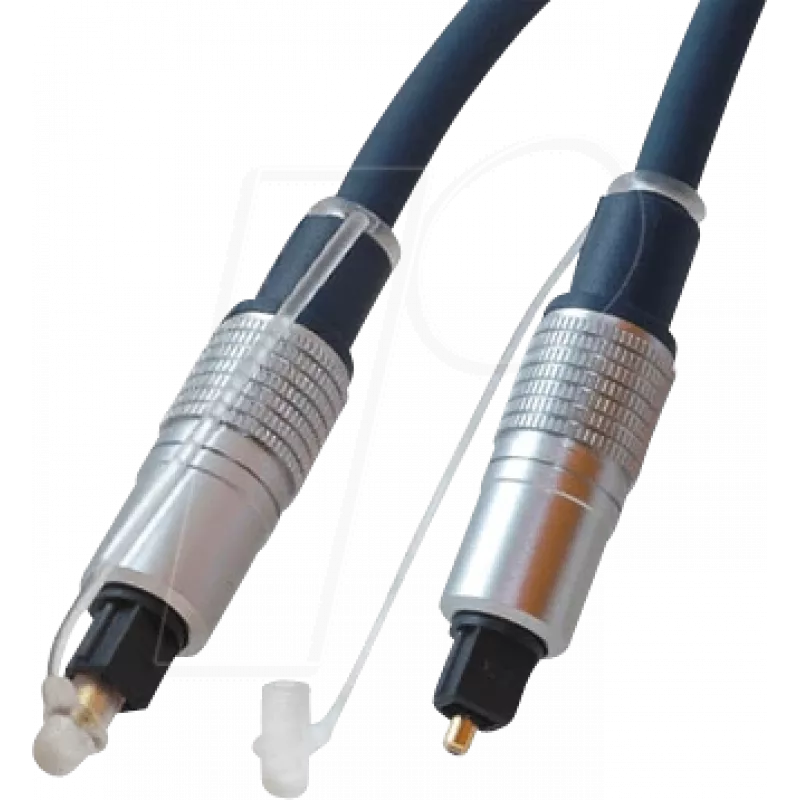
The ShiverPeaks SP69006-2.0 is a 2-meter TOSLINK optical audio cable designed for digital audio connections between devices. This cable features male-to-male TOSLINK connectors with gold-plated contacts to maintain stable signal transfer and reduce wear. The blue outer jacket provides a visible, org... Ler mais
Stock 204 Código 2256176 Marca SHIVERPEAKS Modelo SP69006-2.0 Garantia 2 anos

Envios e devoluções

Entrega prevista Sexta-feira, Outubro 23
Receberá atualizações através do nosso sistema de seguimento detalhado
Opções de pagamento
Cartão bancárioVisaMastercardPayPalApple PayGoogle PayTransferência bancária

The ShiverPeaks SP69006-2.0 is a 2-meter TOSLINK optical audio cable designed for digital audio connections between devices. This cable features male-to-male TOSLINK connectors with gold-plated contacts to maintain stable signal transfer and reduce wear. The blue outer jacket provides a visible, organized cable route in home theater and entertainment setups while preserving the integrity of digital audio signals without electromagnetic interference.

Advantages

The cable offers reliable optical signal transmission with low latency and immunity to electrical noise. Gold-plated contacts improve contact reliability and corrosion resistance for longer service life. Its 2 m length balances reach and cable management for typical living room layouts. The colored jacket helps identify connections quickly in multi-cable installations.

Suitable for

  • Connecting TVs to soundbars or AV receivers
  • Linking gaming consoles to audio systems
  • Joining CD players, DACs, or set-top boxes to home audio equipment
  • Temporary or permanent installations in home theater setups

Key specifications

  • Connector type: TOSLINK (optical) male to male
  • Cable length: 2 meters
  • Contact plating: gold-plated contacts for improved durability
  • Outer jacket color: blue
  • Signal type: digital optical audio (PCM, multichannel depending on device support)

How to use

Ensure both source and target devices support TOSLINK optical connections and are powered off before connecting. Align the TOSLINK connector with the optical port and insert gently until it seats; do not force the connector. Power on devices and select the optical input/output in device menus if required. Avoid sharp bends in the cable and keep the optical ends free of dust or debris for optimal performance.

Recommendations

For consistent performance, handle the optical connectors by the housing, keep protective caps on when not in use, and periodically inspect connector ends for dust. Use the 2 m length in setups where the devices are within moderate distance to prevent excess slack and signal path disruption.

Destaques principais
  • Connecting TVs to soundbars or AV receivers
  • Linking gaming consoles to audio systems
  • Joining CD players, DACs, or set-top boxes to home audio equipment
  • Temporary or permanent installations in home theater setups
  • Connector type: TOSLINK (optical) male to male
  • Cable length: 2 meters
  • Contact plating: gold-plated contacts for improved durability
  • Outer jacket color: blue
  • Signal type: digital optical audio (PCM, multichannel depending on device support)
Especificações
Comprimento do cabo
2 m
Conector 1
TOSLINK
Conector 2
TOSLINK
Cor do produto
Blue
Formato do conector 1
Straight
Formato do conector 2
Straight
Género do conector 1
Male
Género do conector 2
Male
Revestimento dos contactos do conector
Gold
Histórico de preços nos últimos 6 meses
Cabo de áudio TOSLINK ShiverPeaks SP69006-2.0 2m azul
Atual
17,56 €
Mais baixo
17,00 €
Mais alto
17,87 €
Variação 24 h
+0,51 €   +3%
Semana
-0,13 €   -1%
Mês
—   

Produtos populares nesta categoria

Olá, sou o assistente de IA da DistriNode. Posso ajudá-lo a encontrar produtos, comparar opções, criar orçamentos em PDF ou abrir pedidos de suporte.