
Conta Contactos
O seu carrinho
Envio por DPD e FedEx
Precisa de ajuda? Pergunte à IA

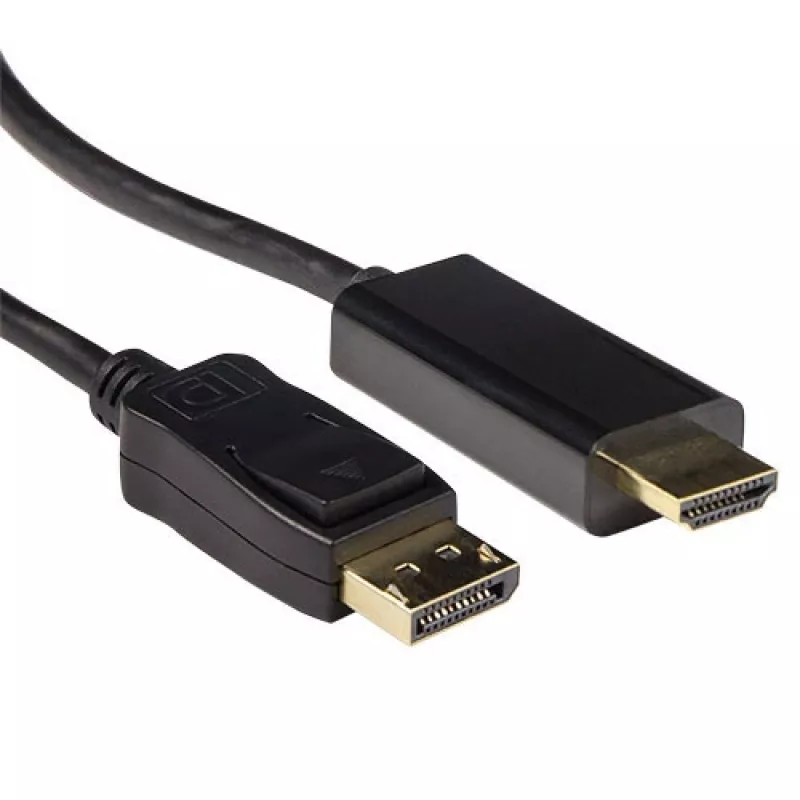
Cabo de conversão ACT DisplayPort macho para HDMI-A macho 0,50 m

Cabo de conversão ACT DisplayPort macho para HDMI-A macho 0,50 m
33,22 €
The ACT Conversion cable DisplayPort male to HDMI-A male 0.50 m provides a compact, single-cable solution for connecting DisplayPort source devices to HDMI displays. With a DisplayPort male connector on one end and an HDMI-A male connector on the other, this 0.5 m cable transmits both high-definitio... Ler mais
Stock 188 Código 2217641 Marca ACT Modelo AK3987 Garantia 2 anos

Envios e devoluções

Entrega prevista Terça-feira, Outubro 27
Receberá atualizações através do nosso sistema de seguimento detalhado
Opções de pagamento
Cartão bancárioVisaMastercardPayPalApple PayGoogle PayTransferência bancária

The ACT Conversion cable DisplayPort male to HDMI-A male 0.50 m provides a compact, single-cable solution for connecting DisplayPort source devices to HDMI displays. With a DisplayPort male connector on one end and an HDMI-A male connector on the other, this 0.5 m cable transmits both high-definition video and audio signals. Its short length and black finish make it suitable for desktop setups, meeting rooms and AV installations where a tidy, direct connection is required.

Advantages

This conversion cable supports uncompressed digital video and audio transmission between DisplayPort output devices and HDMI input displays, reducing the need for additional adapters or converters. The short 0.5 m length minimises cable clutter and signal loss over short runs. Constructed with standard connector types, the cable is compatible with a wide range of monitors, projectors and TVs that accept HDMI input. The black outer jacket provides a neutral appearance that integrates into most AV environments.

Key specifications

  • Cable length: 0.5 m
  • Connector 1: DisplayPort (male)
  • Connector 2: HDMI-A (male)
  • Signal type: Digital video and audio
  • Colour: Black

How to use

Connect the DisplayPort male connector to the DisplayPort output on your source device and insert the HDMI-A male connector into the HDMI input on your display device. Ensure both devices are powered on and set the display to the correct HDMI input. The cable transmits audio and video automatically where the source and display support signal handshaking; no external power or drivers are required for typical setups. For best results, avoid bending the cable sharply near the connectors and keep the run within short distances appropriate for the cable length.

Recommendations

Use this 0.5 m DisplayPort-to-HDMI cable for short, direct connections between a DisplayPort-equipped computer and an HDMI monitor, TV or projector. Verify that your source device supports DisplayPort output with HDMI-compatible signalling if passive conversion is required; for devices with active conversion needs, consider an active adapter. Store the cable coiled loosely and avoid excessive strain on the connector ends to maintain a reliable connection.

Destaques principais
  • Подключение ноутбуков и настольных ПК с выходом DisplayPort к телевизорам и мониторам с HDMI
  • Подключение к проекторам в конференц-залах и учебных аудиториях
  • Краткие кабельные соединения за рабочими столами и в медиа-консолях
  • Cable length: 0.5 m
  • Connector 1: DisplayPort (male)
  • Connector 2: HDMI-A (male)
  • Signal type: Digital video and audio
  • Colour: Black
Especificações
Código do Sistema Harmonizado (HS)
84733080
Comprimento do cabo
0.5 m
Conector 1
DisplayPort
Conector 2
HDMI
Cor do produto
Black
Género do conector 1
Male
Género do conector 2
Male

Folheto

Abrir documento
Histórico de preços nos últimos 6 meses
Cabo de conversão ACT DisplayPort macho para HDMI-A macho 0,50 m
Atual
33,22 €
Mais baixo
27,32 €
Mais alto
33,22 €
Variação 24 h
+0,50 €   +2%
Semana
+0,43 €   +1%
Mês
—   

Produtos populares nesta categoria

Olá, sou o assistente de IA da DistriNode. Posso ajudá-lo a encontrar produtos, comparar opções, criar orçamentos em PDF ou abrir pedidos de suporte.