
Conta Contactos
O seu carrinho
Envio por DPD e FedEx
Precisa de ajuda? Pergunte à IA

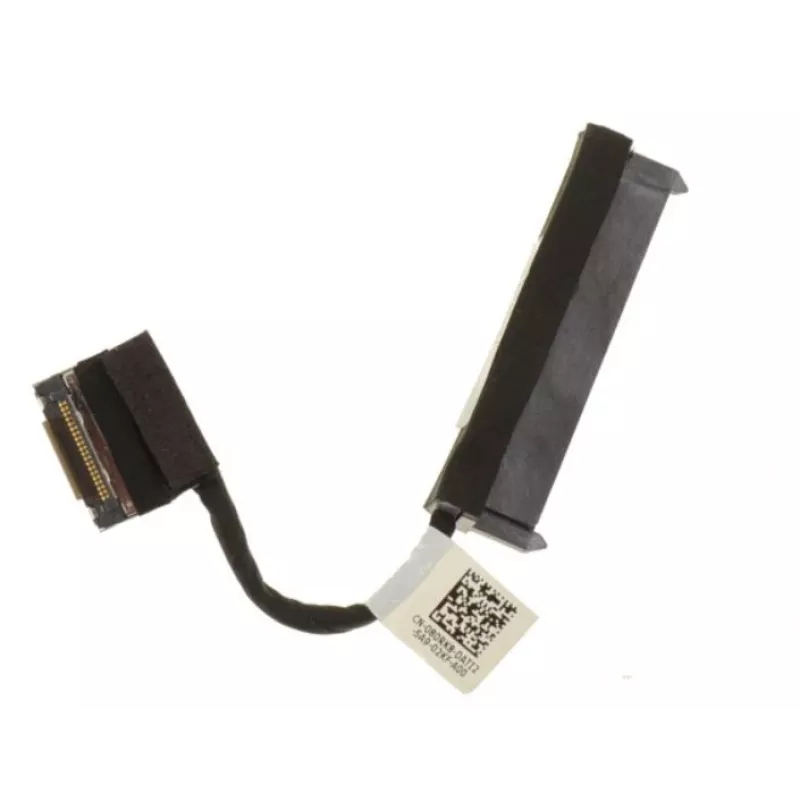
Cabo SATA HDD/SSD da Dell — Compatível com sistemas Dell, MPN 80RK8

Cabo SATA HDD/SSD da Dell — Compatível com sistemas Dell, MPN 80RK8
18,14 €
SATA HDD/SSD Cable by Dell is an internal SATA data cable designed to connect 2.5" or 3.5" hard disk drives and solid-state drives to compatible Dell desktop or server systems. The cable provides a standard SATA interface for data transfer inside the chassis, intended for drive replacement, upgrades... Ler mais
Stock EsgotadoSem stock Código 1506134 Marca DELL Modelo 80RK8 Garantia 2 anos

Envios e devoluções

SATA HDD/SSD Cable by Dell is an internal SATA data cable designed to connect 2.5" or 3.5" hard disk drives and solid-state drives to compatible Dell desktop or server systems. The cable provides a standard SATA interface for data transfer inside the chassis, intended for drive replacement, upgrades, or routine system maintenance where a reliable internal connection is required.

Advantages

The cable delivers a straightforward, tool-free connection for SATA drives and maintains signal integrity for typical SATA transfer speeds. It is engineered to fit compatible Dell system internal layouts and to minimize routing complexity inside desktop or server enclosures. Its construction supports consistent data transmission and stable physical connection under normal operating conditions.

Suitable for

  • Replacing or upgrading 2.5" or 3.5" HDDs and SSDs in Dell desktops and servers
  • Routine system maintenance and internal drive swaps
  • Installing additional internal drives in supported Dell models

Key specifications

  • Interface: SATA data connection compatible with SATA I/II/III signaling
  • Drive compatibility: 2.5" and 3.5" SATA HDDs and SATA SSDs
  • Form factor: internal cable with standard SATA connectors for motherboard and drive
  • Typical usage environment: desktop and server internal installations

How to use

Power down the system and disconnect it from mains power before beginning. Open the chassis according to the system service manual, locate an available SATA port on the motherboard or backplane, and route the cable to the drive bay following the chassis cable management channels. Firmly insert one end of the cable into the motherboard or backplane SATA port and the other end into the drive’s SATA data connector. Reassemble the system, reconnect power, and verify that the drive is detected in the BIOS/UEFI or operating system. Follow any model-specific instructions provided by the system manufacturer for secure mounting and drive recognition.

Recommendations

Use appropriate anti-static precautions when handling internal components. Avoid sharp bends or excessive tension on the cable and ensure connectors are fully seated to prevent intermittent connections. For best results, pair this cable with properly mounted drives and validated power connections; consult the Dell system documentation for drive bay placement and supported configuration limits.

Destaques principais
  • Replacing or upgrading 2.5" or 3.5" HDDs and SSDs in Dell desktops and servers
  • Routine system maintenance and internal drive swaps
  • Installing additional internal drives in supported Dell models
  • Interface: SATA data connection compatible with SATA I/II/III signaling
  • Drive compatibility: 2.5" and 3.5" SATA HDDs and SATA SSDs
  • Form factor: internal cable with standard SATA connectors for motherboard and drive
  • Typical usage environment: desktop and server internal installations
Histórico de preços nos últimos 6 meses
Cabo SATA HDD/SSD da Dell — Compatível com sistemas Dell, MPN 80RK8
Atual
18,14 €
Mais baixo
17,59 €
Mais alto
18,14 €
Variação 24 h
+0,56 €   +3%
Semana
—   
Mês
—   

Produtos populares nesta categoria

Olá, sou o assistente de IA da DistriNode. Posso ajudá-lo a encontrar produtos, comparar opções, criar orçamentos em PDF ou abrir pedidos de suporte.