
Conta Contactos
O seu carrinho
Envio por DPD e FedEx
Precisa de ajuda? Pergunte à IA

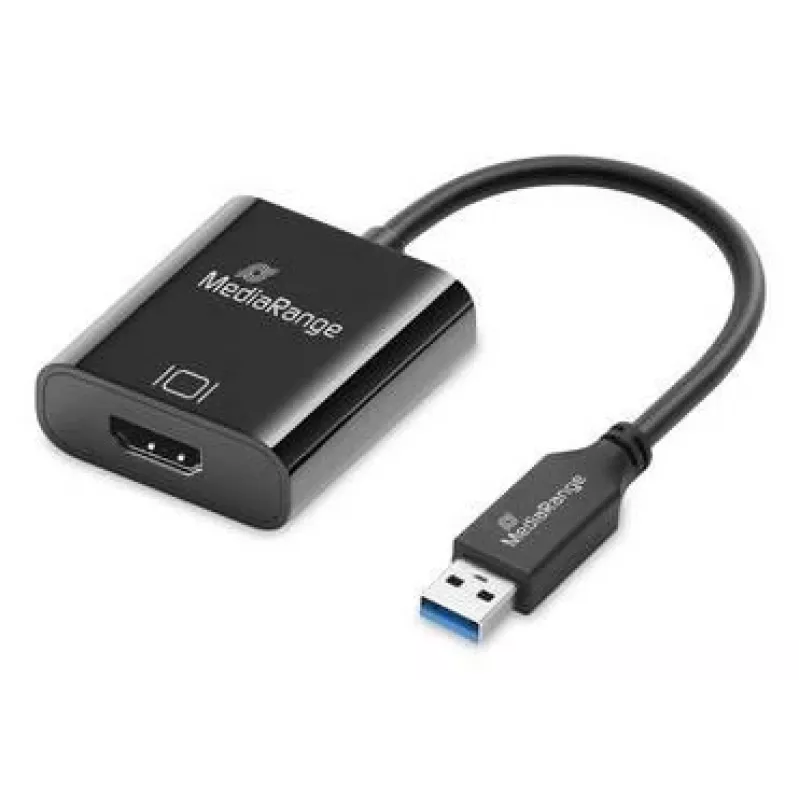
Conversor de áudio e vídeo USB-A para HDMI MediaRange MRCS232, cabo de 20 cm, preto

Conversor de áudio e vídeo USB-A para HDMI MediaRange MRCS232, cabo de 20 cm, preto
28,04 €
The MediaRange USB-A to HDMI Audio and Video Converter MRCS232 provides a simple way to output audio and video from a device with a USB Type-A port to an HDMI display. The adapter includes an integrated 20 cm cable and a HDMI female connector for connecting monitors, TVs or projectors. It supports F... Ler mais
Stock 7 Código 1718149 Marca MEDIARANGE Modelo MRCS232 Garantia 2 anos

Envios e devoluções

Entrega prevista Sexta-feira, Outubro 23
Receberá atualizações através do nosso sistema de seguimento detalhado
Opções de pagamento
Cartão bancárioVisaMastercardPayPalApple PayGoogle PayTransferência bancária

The MediaRange USB-A to HDMI Audio and Video Converter MRCS232 provides a simple way to output audio and video from a device with a USB Type-A port to an HDMI display. The adapter includes an integrated 20 cm cable and a HDMI female connector for connecting monitors, TVs or projectors. It supports Full HD output at 1920 x 1080 pixels and transfers audio together with video for straightforward AV setups without additional adapters.

Advantages

The converter offers Plug & Play compatibility with major desktop operating systems, enabling immediate use without installing drivers. It is compact and lightweight, making it easy to carry and integrate into tight workspaces. With high-speed data transfer capability (up to 5 Gbit/s) and a construction designed for stable connection, the adapter provides synchronized audio and video output for common Full HD applications.

Suitable for

  • Connecting a laptop or desktop with a USB-A port to an HDMI monitor or TV
  • Presentations in meeting rooms or classrooms where a simple HDMI output is needed
  • Home entertainment setups that require Full HD (1920 x 1080 @ 60 Hz) output
  • Temporary or mobile AV setups that benefit from a compact, lightweight adapter

When it may not be suitable

This converter is intended for Full HD transmission up to 1920 x 1080 @ 60 Hz and does not provide native support for higher UHD/4K resolutions. It is not a replacement for dedicated graphics or multi-display docking solutions when advanced multi-monitor features, very high resolutions, or professional-grade video performance are required.

Key specifications

  • Cable length: 0.2 m (integrated)
  • Connector 1: USB Type-A (straight male)
  • Connector 2: HDMI (straight female)
  • Maximum resolution: 1920 x 1080 pixels at 60 Hz
  • Maximum data transfer: up to 5 Gbit/s
  • Color: Black
  • Weight: 34 g
  • Compact dimensions: approximately 45 mm × 45 mm housing footprint

How to use

Connect the USB Type-A plug to an available USB-A port on your laptop or desktop, and then plug a standard HDMI cable into the adapter's HDMI female port and into the display device. Power and data are provided via the USB-A connection. On most systems the adapter is recognized automatically and the display can be configured through the operating system's display settings to extend or mirror the desktop. No additional driver installation is typically required for Windows, macOS, and many Linux distributions.

What to consider before purchase

  • Check that your source device has a USB Type-A port capable of supporting video output via USB-A adapters
  • Ensure your target display accepts HDMI input and supports the desired Full HD resolution and refresh rate
  • If you require resolutions above 1920 x 1080 or multi-monitor advanced features, consider a higher-spec solution

Recommendations

For stable results, use a direct USB-A port on the computer rather than a passive hub and use a high-quality HDMI cable. Configure display settings after connection to select mirror or extend modes and set the resolution to 1920 x 1080 @ 60 Hz for optimal playback.

Destaques principais
  • Connecting a laptop or desktop with a USB-A port to an HDMI monitor or TV
  • Presentations in meeting rooms or classrooms where a simple HDMI output is needed
  • Home entertainment setups that require Full HD (1920 x 1080 @ 60 Hz) output
  • Temporary or mobile AV setups that benefit from a compact, lightweight adapter
  • Cable length: 0.2 m (integrated)
  • Connector 1: USB Type-A (straight male)
  • Connector 2: HDMI (straight female)
  • Maximum resolution: 1920 x 1080 pixels at 60 Hz
  • Maximum data transfer: up to 5 Gbit/s
  • Color: Black
  • Weight: 34 g
  • Compact dimensions: approximately 45 mm × 45 mm housing footprint
  • Check that your source device has a USB Type-A port capable of supporting video output via USB-A adapters
  • Ensure your target display accepts HDMI input and supports the desired Full HD resolution and refresh rate
  • If you require resolutions above 1920 x 1080 or multi-monitor advanced features, consider a higher-spec solution
Especificações
Altura
15 mm
Bitola do fio (AWG)
32
Comprimento do cabo
0.2 m
Conector 1
USB Type-A
Conector 2
HDMI
Cor do produto
Black
Formato do conector 1
Straight
Formato do conector 2
Straight
Género do conector 1
Male
Género do conector 2
Female
Largura
45 mm
Peso
0.034 kg
Plug and Play
Yes
Profundidade
45 mm
Quantidade por embalagem
1 pc(s)
Resolução máxima
1920 x 1080
Revestimento dos contactos do conector
Gold
Sistemas operativos Linux compatíveis
Y
Sistemas operativos Mac compatíveis
Y
Sistemas operativos Windows compatíveis
Y
Taxa de atualização máxima
60 Hz
Taxa de transferência de dados
5 Gbit/s
Tipo de embalagem
Hanging box

Folheto

Abrir documento
Histórico de preços nos últimos 6 meses
Conversor de áudio e vídeo USB-A para HDMI MediaRange MRCS232, cabo de 20 cm, preto
Atual
28,04 €
Mais baixo
25,57 €
Mais alto
30,54 €
Variação 24 h
+0,50 €   +2%
Semana
+2,47 €   +10%
Mês
-1,13 €   -4%

Produtos populares nesta categoria

Olá, sou o assistente de IA da DistriNode. Posso ajudá-lo a encontrar produtos, comparar opções, criar orçamentos em PDF ou abrir pedidos de suporte.