
Conta Contactos
O seu carrinho
Envio por DPD e FedEx
Precisa de ajuda? Pergunte à IA

Ecrã de sinalização inteligente BenQ SL8604 ecrã plano de sinalização digital 2,18 m (86 polegadas) LCD 500 cd/m² 4K Ultra HD preto processador integrado Android

Ecrã de sinalização inteligente BenQ SL8604 ecrã plano de sinalização digital 2,18 m (86 polegadas) LCD 500 cd/m² 4K Ultra HD preto processador integrado Android
36 mês
Ecrã de sinalização inteligente BenQ SL8604 ecrã plano de sinalização digital 2,18 m (86 polegadas) LCD 500 cd/m² 4K Ultra HD preto processador integrado Android
3 839,97 €
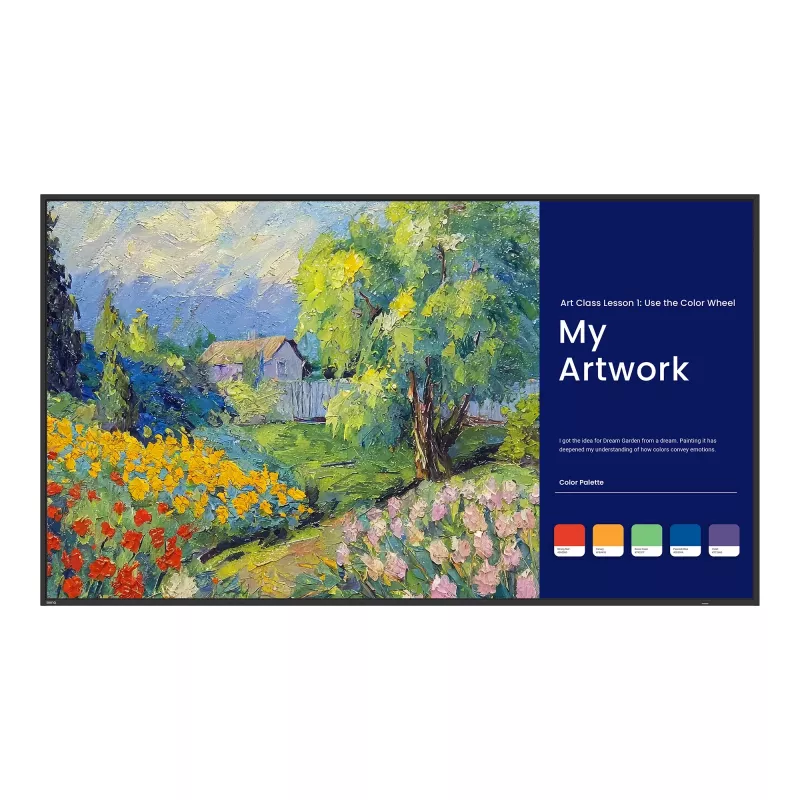
Pantone® Validated SignageA differentlevel of colorSimplify signage with the SL04 series. Accurately deliver Pantone colors, harness the power of Google, and enjoy easy content control for impactful corporate and workplace communication.A series of firstsThe SL04 is the world’s first signage to be P... Ler mais
Stock EsgotadoSem stock Código 113816 Marca BENQ Modelo 9H.S3PTB.DE2 Garantia 3 anos

Envios e devoluções

Pantone® Validated Signage
A different
level of color
Simplify signage with the SL04 series. Accurately deliver Pantone colors, harness the power of Google, and enjoy easy content control for impactful corporate and workplace communication.

A series of firsts

The SL04 is the world’s first signage to be Pantone® Validated, Pantone® SkinTone™ Validated, and Google EDLA certified, and features a vivid color gamut and powerful signage content management.

Vibrant color accuracy
With a 99% sRGB color gamut (CIE 1976) and innovative color modes for various scenarios, the SL04 series offers outstanding color accuracy.

See the world in Pantone colors
The SL04 is the world’s first Pantone Validated and Pantone SkinTone Validated signage. Pantone mode delivers the vibrant hues of the Pantone palette and the nuanced tones of the Pantone SkinTone Guide to enhance color-focused workflows.

Enhanced inclusivity for brand visuals
Pantone SkinTone Guide colors help teams create content that authentically represents diverse skin tones, ideal for branding, marketing, and customer communications.

Your MacBook®, faithfully displayed
M-book mode ensures that the colors you see on your MacBook are accurately displayed on the SL04.

Details made clearer than ever
High-detail mode enhances schematics, blueprints, and floor plans with improved contrast for greater clarity and precision in professional workflows involving architecture, engineering, urban planning, interior design, and more.

Your sketches brought to life
Sketch mode mimics the look of paper by converting images to grayscale, adding a subtle warmth, and reducing display brightness. This enhances visual comfort and saves energy, making it ideal for creative teams in design, product development, fashion, and more.

A truly cinematic experience
Cinema mode lets you play video projects, films, and signage videos with vivid colors and depth. Connect an HDMI cable for HDR10 delivery and enjoy brighter highlights, deeper blacks, and richly detailed shadows for an immersive visual experience.

Your signage solution is here
Vibrant brightness across your workplace
With 500 nits of brightness, the SL04 can easily display your content in lobbies, meeting rooms, break areas, and more.

Easy on the eyes
Enjoy reduced eye strain with an improved anti-glare screen and low blue light technology.

Connect for a complete experience
Maximize the Google ecosystem on the SL04 by connecting USB devices such as a keyboard and mouse for truly seamless collaboration.

Display your way
Mount the VESA-compatible SL04 in portrait or landscape mode to fit a variety of digital signage applications.

Audiovisual excellence

The SL04’s powerful twin 12W speakers and stunning 4K display deliver captivating audiovisual experiences, bringing your content to life.

Control is in your hands
Protect your display with the SL04’s IR sensor lock, preventing unauthorized access from universal remotes.

Enhanced hardware security
Dedicated Wi-Fi and USB covers add a further layer of protection at the hardware level for all your SL04 signage.

Effortless remote signage
With X-Sign, you can easily manage content from any location. Update content on SL04 displays in real time, schedule playlists in advance, and keep your message consistent across all your spaces.

Manage messages from anywhere
Whether it’s a welcome message, an event highlight, or a daily update, X-Sign makes it easy to design and display content across every SL04 screen in your organization.

No surprise pop-ups
With X-Sign, you don’t need to worry about your content being interrupted by message windows and other system alerts, making for a seamless signage solution.

Streamlined management
The BenQ ecosystem makes managing devices, apps, and user accounts simpler than ever to reduce the workload of IT and admin staff.

Giving IT control from anywhere
The BenQ Device Management Solution (DMS) lets IT admins manage SL04 signage remotely, handling device settings, power schedules, firmware updates, app installations, and more.

Easy provisioning
Easily provision multiple new SL04 displays by scanning the barcode on the box or device to connect them to DMS.

Timely firmware updates
Schedule automatic firmware updates to ensure your SL04 displays always have the latest features and security patches.

Designed for next-level collaboration
Easily share any content in meetings
Effortlessly share content across devices with InstaShare 2. Compatible with Windows, Android, macOS, iOS, iPadOS, and ChromeOS, InstaShare 2 allows wireless casting and includes a built-in smart controller for seamless presentation control.

Your files,
your space
Securely log into your BenQ account with the scan of a QR code to find your cloud drives, pinned apps, and website bookmarks. Plus, only you can see your data on the SL04.

ENERGY STAR® certified
The SL04 series is ENERGY STAR 8.0 certified, making it easier for you to lower emissions and cut down on energy costs.

Reduced packaging
We’ve decreased the display’s packaging size by half, improving transport efficiency by 60% and cutting emissions.

Easy energy control
Easily set sleep modes, remote power scheduling, and get real-time energy usage insights with DMS.

How to use

Mount the BenQ SL8604 securely at an appropriate height for the room and connect power and network. Use the Android interface to install or launch required apps, open presentations or play video content. Connect laptops or other devices via the available wired inputs when needed, or use the display’s built-in network features for wireless content sharing. For interactive sessions, enable touch mode and use the annotation tools to write, highlight or manipulate on-screen content.

Recommendations

For classroom and meeting-room use, position the display so that the full screen is visible from the main seating area and avoid strong direct lighting that could cause glare. Keep firmware and installed apps updated through the Android interface. For best touch responsiveness, use approved styluses or soft-tip tools and clean the screen with manufacturer-recommended cleaners on a regular schedule.

Destaques principais
  • Classroom instruction and interactive lessons
  • Corporate meetings, presentations and video conferences
  • Training sessions and workshops requiring shared annotation
  • Digital signage and large-format content display in indoor venues
  • Screen size: 86 inches diagonal
  • Resolution: 3840 × 2160 (4K UHD)
  • Panel technology: LCD
  • Operating system: Android
  • Touch interaction: supports multi-touch input
  • Typical connectivity: wired display inputs and network connectivity for app access
  • Orientation: landscape, suitable for wall or stand mounting
Especificações
Altifalantes incorporados
Yes
Altura da embalagem
225 mm
Altura do ecrã
1098.5 mm
Área ativa do ecrã (L x A)
1895 x 1066 mm
Arquitetura do processador
ARM Cortex-A53+Cortex-A73
Brilho do ecrã
500 cd/m²
Cabos incluídos
HDMI, Serial
Capacidade de armazenamento interno
64 GB
Certificados de sustentabilidade
ENERGY STAR
Colocação suportada
Indoor
Consumo de energia (em espera)
0.5 W
Consumo de energia (típico)
140.7 W
Cor do produto
Black
Design do produto
Digital signage flat panel
Diagonal do ecrã
2.18 m (86")
Ecrã antirreflexo
Yes
Ecrã tátil
No
Ethernet LAN
Yes
Finalidade
Universal
Frequência de entrada CA
50/60 Hz
Humidade relativa de armazenamento (H-H)
10 - 80%
Humidade relativa de funcionamento (H-H)
10 - 80%
Interface de montagem do painel
600 x 400 mm
Largura da embalagem
2123 mm
Largura do ecrã
1927 mm
Memória interna
8 GB
Montagem VESA
Yes
Núcleos do processador
8
Número de entradas HDMI
2
Número de portas DisplayPort
0
Número de portas HDMI
2
Número de portas USB
2
Peso da embalagem
64 kg
Peso do ecrã
49 kg
Porta DVI
No
Porta USB
Yes
Portas Ethernet LAN (RJ-45)
1
Potência nominal RMS
24 W
Processador integrado
Yes
Profundidade da embalagem
1247 mm
Profundidade do ecrã
59.5 mm
Proporção de aspeto nativa
16:9
Rácio de contraste (típico)
1200:1
Resolução do ecrã
3840 x 2160 pixels
Retroiluminação LED
Yes
Sistema informático
Yes
Sistema operativo instalado
Android
Taxa de difusão
25%
Tecnologia do ecrã
LCD
Telecomando incluído
Yes
Temperatura de armazenamento (T-T)
-10 - 60 °C
Temperatura de funcionamento (T-T)
0 - 40 °C
Tempo de resposta
8 ms
Tensão de entrada CA
100 - 240 V
Tipo de HD
4K Ultra HD
Tipo de painel
IPS
Velocidades de dados Ethernet LAN
10,100 Mbit/s
Versão do sistema operativo
13.0
Versão HDMI
2.0
Versão USB
2.0
Vida útil do painel
50000 h
Wi-Fi
No

Folheto

Abrir documento
Histórico de preços nos últimos 6 meses
Ecrã de sinalização inteligente BenQ SL8604 ecrã plano de sinalização digital 2,18 m (86 polegadas) LCD 500 cd/m² 4K Ultra HD preto processador integrado Android
Atual
3 839,97 €
Mais baixo
3 594,58 €
Mais alto
5 559,74 €
Variação 24 h
+174,82 €   +5%
Semana
+164,98 €   +4%
Mês
+101,07 €   +3%

Produtos populares nesta categoria

Vendedor: UAB KUR LT · Laisvės pr. 125A, LT-06118 Vílnius, Lituânia · Código da empresa 303192950 · NIF/IVA UE LT100008198612 · Envio a partir da UE (Lituânia)
Olá, sou o assistente de IA da DistriNode. Posso ajudá-lo a encontrar produtos, comparar opções, criar orçamentos em PDF ou abrir pedidos de suporte.
Todas as categorias