
Conta Contactos
O seu carrinho
Envio por DPD e FedEx
Precisa de ajuda? Pergunte à IA

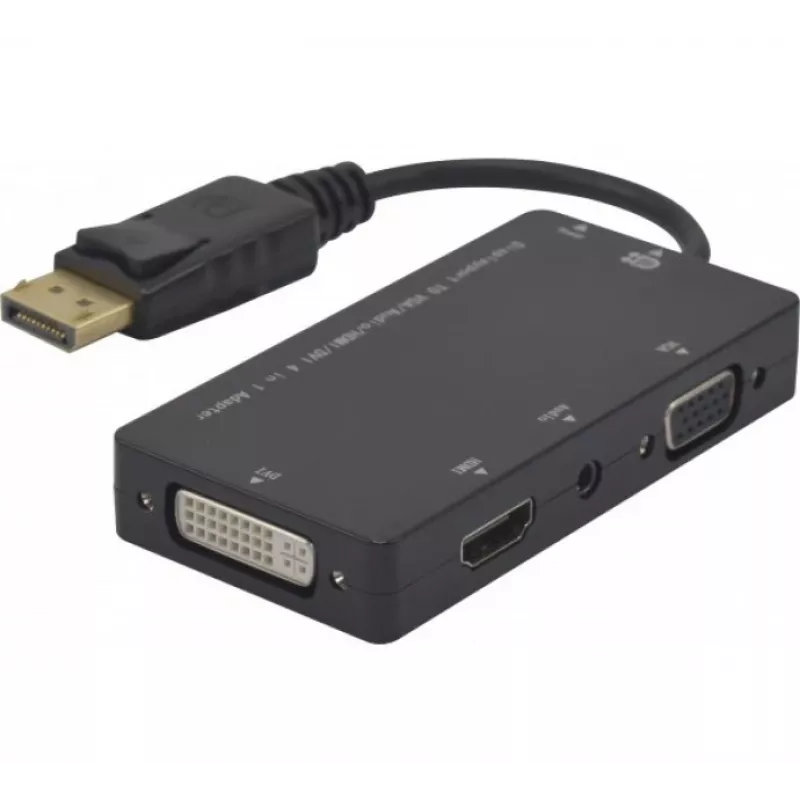
Hypertec 127377-HY Adaptador de cabo de vídeo DisplayPort DVI-D + VGA (D-Sub) + HDMI preto

Hypertec 127377-HY Adaptador de cabo de vídeo DisplayPort DVI-D + VGA (D-Sub) + HDMI preto
38,75 €
The Hypertec ProConnectLite DisplayPort to HDMI, DVI-D, VGA adapter (model 127377-HY) provides a single DisplayPort input with selectable outputs for HDMI, DVI-D and VGA (D-Sub). Designed for connecting a laptop or desktop with DisplayPort to a range of external displays, projectors or older monitor... Ler mais
Stock 70 Código 2396386 Marca Hypertec Modelo 127377-HY Garantia 2 anos

Envios e devoluções

Entrega prevista Terça-feira, Outubro 27
Receberá atualizações através do nosso sistema de seguimento detalhado
Opções de pagamento
Cartão bancárioVisaMastercardPayPalApple PayGoogle PayTransferência bancária

The Hypertec ProConnectLite DisplayPort to HDMI, DVI-D, VGA adapter (model 127377-HY) provides a single DisplayPort input with selectable outputs for HDMI, DVI-D and VGA (D-Sub). Designed for connecting a laptop or desktop with DisplayPort to a range of external displays, projectors or older monitors, the compact black plastic adapter offers a convenient solution for presentations and multi-monitor setups while maintaining a reliable physical connection via a male DisplayPort plug.

Advantages

This adapter supports three common video output standards—HDMI, DVI-D and VGA—allowing compatibility with modern TVs and projectors as well as legacy VGA/DVI displays. The male DisplayPort connector ensures a secure fit to the source device, and the durable plastic housing contributes to everyday portability and resistance to wear. Its compact size simplifies transport and storage.

Suitable for

Key specifications

How to use

Plug the male DisplayPort connector into the DisplayPort output on your computer or laptop. Choose the required output cable (HDMI, DVI-D or VGA) and connect it to the corresponding display input. Power on the display and, if necessary, select the correct input source on the monitor or projector. Configure the display settings in your operating system to set resolution and display mode (mirror, extend, single display) as required.

Recommendations

For best results, use HDMI or DVI-D for digital connections to preserve signal quality; use VGA only when digital inputs are not available. Avoid forcing connectors and ensure the DisplayPort port on the source device supports video output. Keep the adapter in a protective sleeve when transporting to reduce wear.
Destaques principais
  • Connecting a DisplayPort-equipped laptop or desktop to an HDMI TV or monitor
  • Connecting to DVI-D compatible displays or projectors
  • Connecting to legacy VGA (D-Sub) monitors or projectors
  • Presentations, classrooms, meeting rooms and multi-monitor workstations
  • Connector 1: DisplayPort (male)
  • Connector 2: DVI-D + VGA (D-Sub) + HDMI
  • Product colour: Black
  • Brand: Exertis Connect / Hypertec ProConnectLite
  • Manufacturer part number (MPN): EXC127377 / 127377-HY
  • EAN: 3548381273776
Especificações
3D
No
Conector 1
DisplayPort
Conector 2
DVI-D + VGA (D-Sub) + HDMI
Conector de áudio
Yes
Cor do produto
Black
Formato do conector 1
Straight
Formato do conector 2
Straight
Género do conector 1
Male
Género do conector 2
Female
Largura da fita
10800 MB/s
Material
Plastic
Quantidade por embalagem
1 pc(s)
Resolução máxima
1920 x 1080 pixels
Tipo de conector de áudio
3.5 mm (1/8")
Tipo de conversor
Passive video converter
Versão DisplayPort
1.1

Folheto

Abrir documento
Histórico de preços nos últimos 6 meses
Hypertec 127377-HY Adaptador de cabo de vídeo DisplayPort DVI-D + VGA (D-Sub) + HDMI preto
Atual
38,75 €
Mais baixo
38,31 €
Mais alto
38,75 €
Variação 24 h
+0,29 €   +1%
Semana
+0,21 €   +1%
Mês
—   

Produtos populares nesta categoria

Olá, sou o assistente de IA da DistriNode. Posso ajudá-lo a encontrar produtos, comparar opções, criar orçamentos em PDF ou abrir pedidos de suporte.