
Conta Contactos
O seu carrinho
Envio por DPD e FedEx
Precisa de ajuda? Pergunte à IA

Placa DELOCK PCI Express x4 com 1× USB Type-C 20 Gbit/s e 2× conectores USB (Modelo 90891)

Placa DELOCK PCI Express x4 com 1× USB Type-C 20 Gbit/s e 2× conectores USB (Modelo 90891)
118,66 €
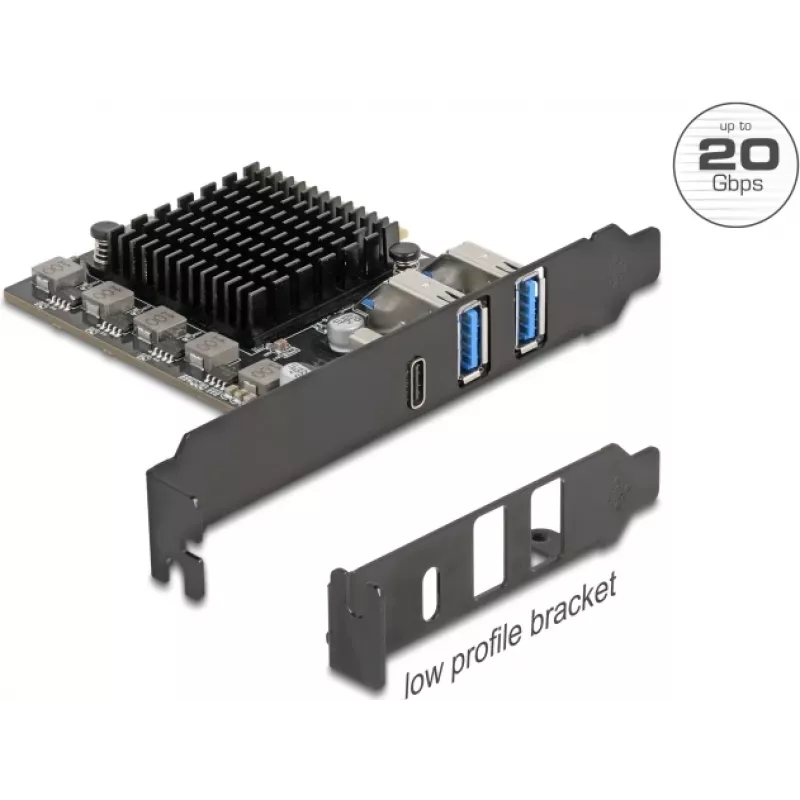
DELOCK PCI Express x4 card with 1× USB Type-C 20 Gbps and 2× USB ports (model 90891) is a PCIe expansion card that provides one USB Type-C port with up to 20 Gbps transfer speed plus two additional USB ports. It is designed for installation into a PCI Express x4 slot on desktop motherboards to add h... Ler mais
Stock EsgotadoSem stock Código 2247812 Marca DELOCK Modelo 90891 Garantia 2 anos

Envios e devoluções

DELOCK PCI Express x4 card with 1× USB Type-C 20 Gbps and 2× USB ports (model 90891) is a PCIe expansion card that provides one USB Type-C port with up to 20 Gbps transfer speed plus two additional USB ports. It is designed for installation into a PCI Express x4 slot on desktop motherboards to add high-speed USB connectivity for external storage devices, docking stations, peripherals and charging needs. The card integrates with standard PCIe slots and presents additional ports to the host operating system for straightforward device access.

Advantages

The PCI Express x4 form factor enables installation in a variety of desktop systems while minimizing occupied lane resources. The USB Type-C port supports high data throughput to external NVMe enclosures and high-speed peripherals, and the additional USB ports increase overall connectivity without relying on motherboard headers. The card is a practical solution to upgrade older systems lacking modern USB-C interfaces, offering improved data transfer rates and broader peripheral compatibility.

Suitable for

Key specifications

How to use

Power off the computer and disconnect it from the mains. Open the desktop case following the manufacturer’s instructions, locate an available PCI Express x4 (or larger) slot, and remove the corresponding expansion slot cover. Insert the card firmly into the slot until it seats fully; secure the card to the chassis with the slot screw. Close the case, reconnect power and start the system. Install any required drivers supplied by the operating system or vendor; once recognized, connect USB devices to the Type-C or Type-A ports as needed. For optimal performance with high-speed storage, use appropriate USB 3.x compatible cables and ports on the host.

Recommendations

Use a high-quality USB Type-C cable rated for 20 Gbps to achieve maximum transfer speeds. If using the card for external storage, ensure the enclosure and drive support the intended throughput. Verify BIOS and operating system compatibility before installation and apply vendor drivers if automatic recognition does not occur. For confined chassis or small form-factor systems, confirm bracket clearance and slot availability prior to purchase.

Destaques principais
  • Connecting external SSDs, HDDs and NVMe enclosures that require high data throughput
  • Adding USB Type-C docking stations or hubs to a desktop PC
  • Expanding the number of available USB ports for peripherals such as keyboards, mice and printers
  • Upgrading older systems to support modern USB-C devices and faster file transfers
  • Interface: PCI Express x4 (fits x4, x8 or x16 slots)
  • Ports: 1 × USB Type-C (up to 20 Gbps), 2 × USB Type-A ports
  • Maximum data transfer: up to 20 Gbps on the USB Type-C port
  • Form factor: low-profile compatible bracket possible (depends on package contents)
  • Compatibility: standard desktop PCIe slot compatibility with common operating systems (driver requirements may apply)
O histórico de preços ainda não está disponível
Ainda estamos a recolher dados de preços diários suficientes para este produto.

Produtos populares nesta categoria

Olá, sou o assistente de IA da DistriNode. Posso ajudá-lo a encontrar produtos, comparar opções, criar orçamentos em PDF ou abrir pedidos de suporte.