
Conta Contactos
O seu carrinho
Envio por DPD e FedEx
Precisa de ajuda? Pergunte à IA

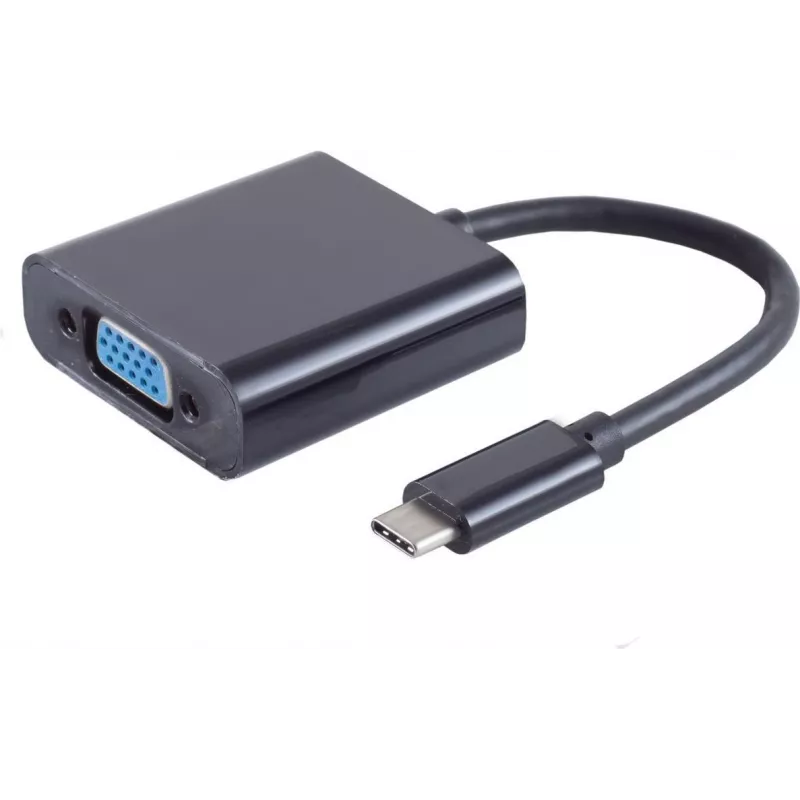
Adaptador de cabo de vídeo USB Type-C VGA D-Sub preto S/CONN 14-05006

Adaptador de cabo de vídeo USB Type-C VGA D-Sub preto S/CONN 14-05006
21,29 €
The S/CONN 14-05006 Video Cable Adapter USB Type-C VGA D-Sub Black from ShiverPeaks is a compact adapter that converts a USB Type-C output to a VGA (D-Sub) connection. Constructed from durable ABS synthetics and finished in black, this adapter provides a physical interface between modern USB-C devic... Ler mais
Stock 530 Código 2351918 Marca SHIVERPEAKS Modelo 14-05006 Garantia 2 anos

Envios e devoluções

Entrega prevista Terça-feira, Outubro 27
Receberá atualizações através do nosso sistema de seguimento detalhado
Opções de pagamento
Cartão bancárioVisaMastercardPayPalApple PayGoogle PayTransferência bancária

The S/CONN 14-05006 Video Cable Adapter USB Type-C VGA D-Sub Black from ShiverPeaks is a compact adapter that converts a USB Type-C output to a VGA (D-Sub) connection. Constructed from durable ABS synthetics and finished in black, this adapter provides a physical interface between modern USB-C devices and legacy VGA displays, projectors or monitors. Its male USB Type-C connector fits directly into the source device while the VGA output accepts a standard VGA cable for video transmission.

Advantages

This adapter offers straightforward, cable-style conversion without requiring external power. The ABS housing provides impact resistance and long-term durability while the compact form factor supports easy portability and quick setup. It preserves analog VGA signal compatibility for displays that do not support digital inputs, enabling extended use of existing monitors and projectors.

Suitable for

  • Connecting laptops, tablets or smartphones with USB Type-C ports to VGA projectors
  • Presentations in meeting rooms and classrooms with VGA-equipped displays
  • Extending or mirroring a laptop display to an older VGA monitor

Key specifications

  • Input connector: USB Type-C (male)
  • Output connector: VGA D-Sub (female)
  • Housing material: ABS synthetic
  • Colour: Black

How to use

Plug the USB Type-C connector of the adapter into the USB-C port of your source device. Connect a standard VGA cable from the adapter's VGA output to the VGA input on the display or projector. Power on both devices and select the appropriate input on the display. Configure display settings on the source device as needed to extend, mirror or set the desired resolution. No additional drivers are typically required for basic video output, though device-specific settings may affect available resolutions.

Recommendations

Use a quality VGA cable and avoid excessive bending at connector points to maintain signal integrity. For optimal results, verify the maximum supported resolution of the target display and adjust the source device output accordingly. Disconnect the adapter by pulling the connector body rather than the cable to prolong service life.

Destaques principais
  • Connecting laptops, tablets or smartphones with USB Type-C ports to VGA projectors
  • Presentations in meeting rooms and classrooms with VGA-equipped displays
  • Extending or mirroring a laptop display to an older VGA monitor
  • Input connector: USB Type-C (male)
  • Output connector: VGA D-Sub (female)
  • Housing material: ABS synthetic
  • Colour: Black
Especificações
Conector 1
USB Type-C
Conector 2
VGA (D-Sub)
Cor do produto
Black
Formato do conector 1
Straight
Formato do conector 2
Straight
Género do conector 1
Male
Género do conector 2
Female
Material
ABS synthetics
Quantidade por embalagem
1 pc(s)
Histórico de preços nos últimos 6 meses
Adaptador de cabo de vídeo USB Type-C VGA D-Sub preto S/CONN 14-05006
Atual
21,29 €
Mais baixo
20,73 €
Mais alto
21,29 €
Variação 24 h
+0,55 €   +3%
Semana
+0,27 €   +1%
Mês
+0,30 €   +1%

Produtos populares nesta categoria

Olá, sou o assistente de IA da DistriNode. Posso ajudá-lo a encontrar produtos, comparar opções, criar orçamentos em PDF ou abrir pedidos de suporte.