
Conta Contactos
O seu carrinho
Envio por DPD e FedEx
Precisa de ajuda? Pergunte à IA

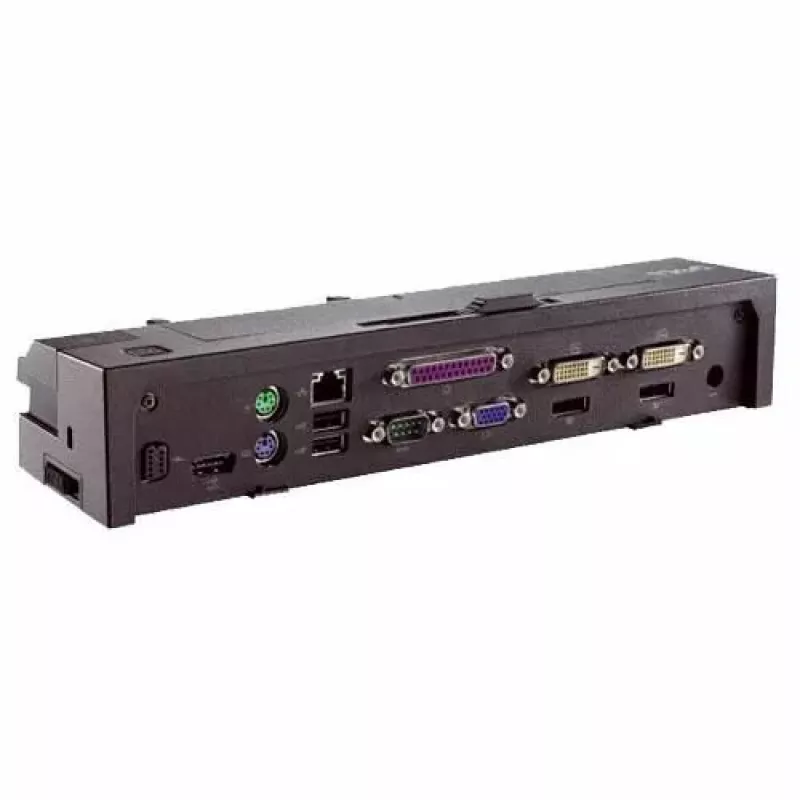
Docking station Dell Kit Advanced Port Replicator G889C

Docking station Dell Kit Advanced Port Replicator G889C
222,69 €
The Dell Kit Advanced Port Replicator G889C provides an expanded set of ports to simplify connecting a laptop to external displays, wired networks and peripherals. Designed for users who switch between mobile and desktop environments, the docking station consolidates HDMI video, multiple USB connect... Ler mais
Stock EsgotadoSem stock Código 2573422 Marca DELL Modelo G889C Garantia 2 anos

Envios e devoluções

The Dell Kit Advanced Port Replicator G889C provides an expanded set of ports to simplify connecting a laptop to external displays, wired networks and peripherals. Designed for users who switch between mobile and desktop environments, the docking station consolidates HDMI video, multiple USB connections and Gigabit Ethernet into a compact unit that occupies minimal desk space while offering stable, wired connectivity for workstations and home offices.

Advantages

This docking station centralizes common I/O ports into a single hub, reducing cable changes and speeding transitions between locations. The compact footprint conserves workspace and helps keep cables organized. It supports simultaneous connection of display, network and USB devices, enabling reliable wired Ethernet performance and direct video output without relying on multiple adapters.

Suitable for

  • Office workers who need to connect a laptop to an external monitor, keyboard and mouse
  • Home office setups requiring stable wired Ethernet and fast peripheral access
  • IT environments where quick docking/undocking improves device management
  • Presentations or meeting rooms that require easy connection to HDMI displays

Key specifications

  • Video output: HDMI port for external monitor connection
  • Network: Gigabit Ethernet port for wired LAN access
  • USB: multiple USB ports for peripherals and data transfer
  • Form factor: compact desktop dock to minimize workspace footprint
  • Compatibility: designed for broad laptop compatibility with external docking functionality

How to use

Place the docking station on a stable surface near your laptop and connect the power supply if required. Use the primary cable to connect the dock to the laptop, then attach peripherals such as an HDMI cable to an external monitor, a network cable to the Ethernet port, and USB devices to the available USB ports. After connecting, configure display and network settings on the laptop as needed to enable external monitor output and wired network access.

Recommendations

For optimal performance, connect the docking station to a grounded power source and use high-quality HDMI and Ethernet cables. Verify that your laptop’s display drivers and network adapters are up to date. When moving the laptop, safely eject any external storage devices before undocking to prevent data loss.

Destaques principais
  • Office workers who need to connect a laptop to an external monitor, keyboard and mouse
  • Home office setups requiring stable wired Ethernet and fast peripheral access
  • IT environments where quick docking/undocking improves device management
  • Presentations or meeting rooms that require easy connection to HDMI displays
  • Video output: HDMI port for external monitor connection
  • Network: Gigabit Ethernet port for wired LAN access
  • USB: multiple USB ports for peripherals and data transfer
  • Form factor: compact desktop dock to minimize workspace footprint
  • Compatibility: designed for broad laptop compatibility with external docking functionality
O histórico de preços ainda não está disponível
Ainda estamos a recolher dados de preços diários suficientes para este produto.

Produtos populares nesta categoria

Olá, sou o assistente de IA da DistriNode. Posso ajudá-lo a encontrar produtos, comparar opções, criar orçamentos em PDF ou abrir pedidos de suporte.