
Conta Contactos
O seu carrinho
Envio por DPD e FedEx
Precisa de ajuda? Pergunte à IA

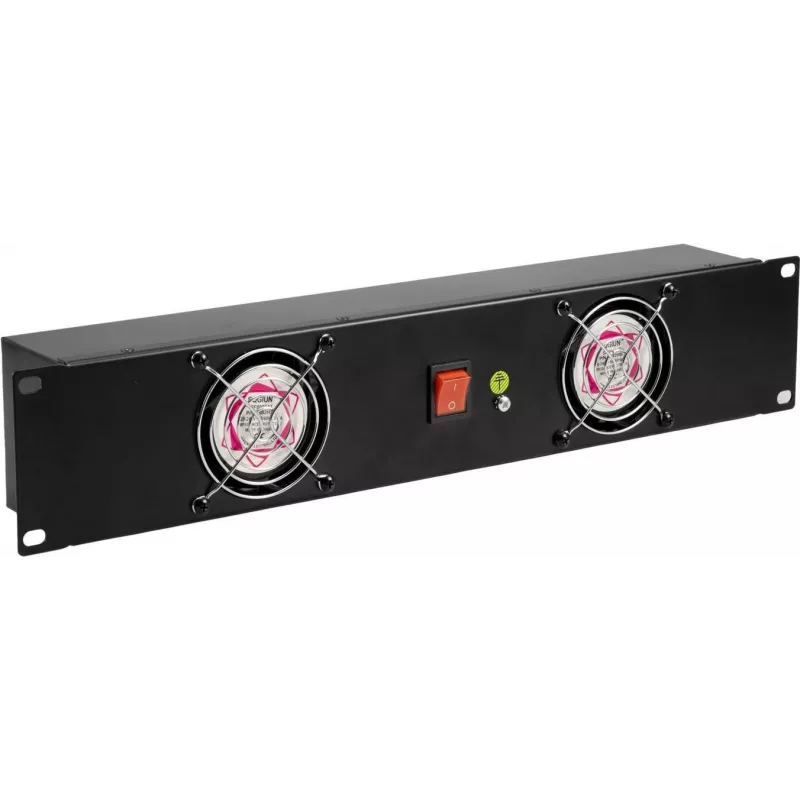
Painel frontal para rack Omnitronic Z-19 2U com 2 ventoinhas para rack de 19 polegadas

Painel frontal para rack Omnitronic Z-19 2U com 2 ventoinhas para rack de 19 polegadas
75,99 €
The Omnitronic Z-19 2U front panel is a 2U rack accessory designed for standard 19" cabinets. It integrates two front-mounted fans to provide active airflow through the rack, helping to control temperature and reduce the risk of overheating for installed equipment. The panel is intended for use in p... Ler mais
Stock 50 Código 2353387 Marca OMNITRONIC Modelo 30100820 Garantia 2 anos

Envios e devoluções

Entrega prevista Quinta-feira, Outubro 22
Receberá atualizações através do nosso sistema de seguimento detalhado
Opções de pagamento
Cartão bancárioVisaMastercardPayPalApple PayGoogle PayTransferência bancária

The Omnitronic Z-19 2U front panel is a 2U rack accessory designed for standard 19" cabinets. It integrates two front-mounted fans to provide active airflow through the rack, helping to control temperature and reduce the risk of overheating for installed equipment. The panel is intended for use in professional audio, broadcast and IT racks where additional front ventilation improves component reliability and stability. The unit fits typical 19" rack rails and is sized to occupy two rack units.

Advantages

This front panel delivers focused front-to-back airflow with two built-in fans, enabling improved heat dissipation in enclosed racks. Its 2U form factor preserves valuable rack space while adding active cooling where needed. The panel is compatible with standard 19" mounting, allowing straightforward installation without custom modifications. By providing additional front ventilation, it helps maintain optimal operating temperatures for sensitive electronics and reduces the likelihood of thermal throttling or premature component failure.

Suitable for

Key specifications

How to use

Install the Omnitronic Z-19 2U front panel into available 19" rack rails occupying two rack units. Secure the panel with appropriate rack screws at the mounting points. Connect the fans to the rack's power source according to the fan power interface provided on the panel; ensure power is switched off during installation. Position the panel so airflow is directed from the front toward the rear of the rack, complementing any existing rear exhaust or cabinet ventilation. After installation, verify that the fans operate smoothly and that airflow is unobstructed by cabling or mounted devices.

Recommendations

For reliable cooling performance, maintain clear airflow paths by routing cables neatly and leaving space around fan intakes. Use the panel in combination with rear exhaust fans or cabinet ventilation to establish consistent front-to-back airflow. Periodically inspect and clean fan intakes to prevent dust buildup, and confirm electrical connections match the rack's power specifications before powering the fans.

Destaques principais
  • Audio racks housing mixers, processors and power amplifiers
  • Broadcast equipment racks with transmitters, encoders and routers
  • IT server and network racks that require supplementary front airflow
  • Rack cabinets in small studios, live venues and control rooms
  • Form factor: 2U, fits standard 19" rack rails
  • Cooling: two integrated front-mounted fans providing active ventilation
  • Mounting: front panel installation for 19" rack enclosures
  • Application environment: professional audio, broadcast and IT racks
  • Primary function: front airflow management to assist heat dissipation
Histórico de preços nos últimos 6 meses
Painel frontal para rack Omnitronic Z-19 2U com 2 ventoinhas para rack de 19 polegadas
Atual
75,99 €
Mais baixo
75,06 €
Mais alto
77,23 €
Variação 24 h
+0,10 €   +0%
Semana
+0,64 €   +1%
Mês
—   
Olá, sou o assistente de IA da DistriNode. Posso ajudá-lo a encontrar produtos, comparar opções, criar orçamentos em PDF ou abrir pedidos de suporte.