
Conta Contactos
O seu carrinho
Envio por DPD e FedEx
Precisa de ajuda? Pergunte à IA

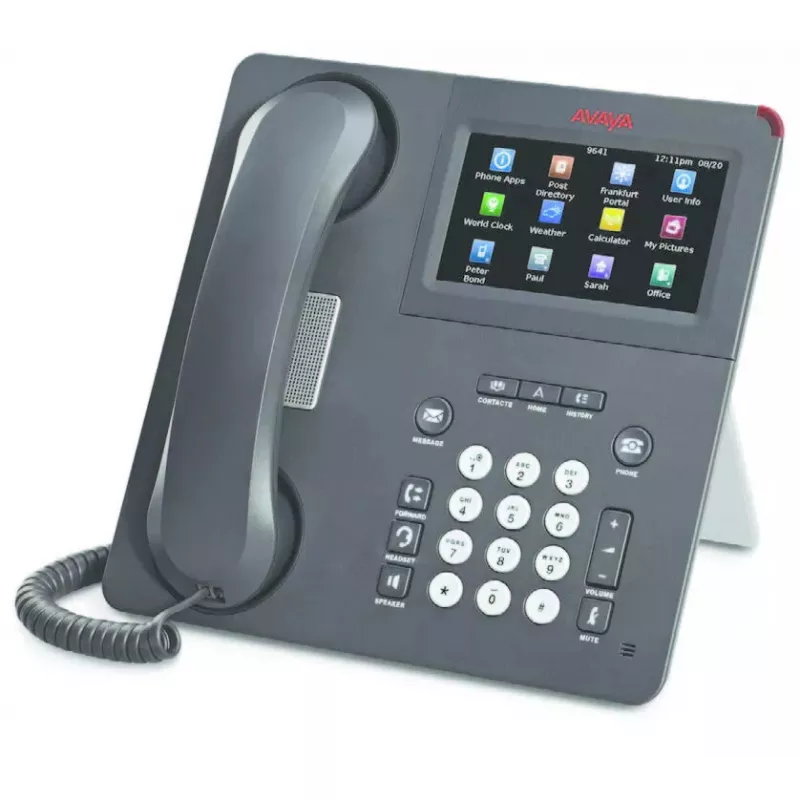
Telefone IP de secretária Avaya 9650C carvão 2 linhas LCD

Telefone IP de secretária Avaya 9650C carvão 2 linhas LCD
98,41 €
The Avaya 9650C IP Deskphone in charcoal is a two-line VoIP deskphone designed for office use. It offers a clear LCD display, speakerphone, Bluetooth support and Ethernet LAN with Power over Ethernet (PoE). Compatible with Avaya Aura® and, for most models in the 9600 family, Avaya IP Office (note: s... Ler mais
Stock 45 Código 2572796 Marca AVAYA Modelo 700461213 Garantia 2 anos

Envios e devoluções

Entrega prevista Terça-feira, Outubro 27
Receberá atualizações através do nosso sistema de seguimento detalhado
Opções de pagamento
Cartão bancárioVisaMastercardPayPalApple PayGoogle PayTransferência bancária

The Avaya 9650C IP Deskphone in charcoal is a two-line VoIP deskphone designed for office use. It offers a clear LCD display, speakerphone, Bluetooth support and Ethernet LAN with Power over Ethernet (PoE). Compatible with Avaya Aura® and, for most models in the 9600 family, Avaya IP Office (note: some models such as 9670G and 9601 are not compatible), the 9650C provides reliable audio and a compact interface suited to everyday voice communications.

Advantages

The Avaya 9650C delivers good audio quality and low power consumption thanks to PoE support. Its two-line LCD display and context-aware interface simplify call handling, while built-in speakerphone and Bluetooth increase flexibility for hands-free and accessory connections. The unit’s charcoal finish and compact size make it suitable for standard workstations where a straightforward, dependable IP phone is required.

Suitable for

  • Office desktops and reception desks
  • Small and medium business environments using Avaya Aura®
  • Workplaces needing a compact two-line IP phone with speakerphone and Bluetooth

Key specifications

  • Display: LCD
  • Lines: 2 lines
  • Speakerphone: Yes
  • Ethernet LAN: Yes
  • Bluetooth: Yes
  • Power: Power over Ethernet (PoE)
  • Colour: Charcoal
  • Protocols: H.323 and SIP

How to use

Connect the Avaya 9650C to your LAN using an Ethernet cable; if your network supports PoE the phone will receive power through the same cable. Configure call accounts using the phone’s LCD interface or through your Avaya Aura® (or compatible IP Office) provisioning system. Use the handset, speakerphone or a Bluetooth headset for calls, and adjust volume via the phone’s digital controls. Follow your system administrator’s instructions for SIP or H.323 account setup and network parameters.

Recommendations

For optimal operation, install the Avaya 9650C on a network with sufficient bandwidth and QoS configured for VoIP. Use PoE for simplified cabling and ensure firmware is kept up to date according to Avaya’s release notes.
Destaques principais
  • Office desktops and reception desks
  • Small and medium business environments using Avaya Aura®
  • Workplaces needing a compact two-line IP phone with speakerphone and Bluetooth
  • Display: LCD
  • Lines: 2 lines
  • Speakerphone: Yes
  • Ethernet LAN: Yes
  • Bluetooth: Yes
  • Power: Power over Ethernet (PoE)
  • Colour: Charcoal
  • Protocols: H.323 and SIP
Especificações
Bluetooth
Yes
Chamada em conferência
Yes
Controlo de volume
Digital
Cor do produto
Charcoal
Ecrã
LCD
Ethernet LAN
Yes
Mãos-livres
Yes
Número de linhas
2 lines
Número de portas USB 1.1
1
Número de teclas do teclado
28
Portas Ethernet LAN (RJ-45)
1
Power over Ethernet (PoE)
Yes
Protocolos de rede suportados
H.323+ SIP
Saídas para auscultadores
1
Suporte para módulos de expansão
Yes
Tipo de produto
IP Phone
Histórico de preços nos últimos 6 meses
Telefone IP de secretária Avaya 9650C carvão 2 linhas LCD
Atual
98,41 €
Mais baixo
97,48 €
Mais alto
98,84 €
Variação 24 h
+0,92 €   +1%
Semana
-0,43 €   0%
Mês
-0,28 €   0%

Produtos populares nesta categoria

Olá, sou o assistente de IA da DistriNode. Posso ajudá-lo a encontrar produtos, comparar opções, criar orçamentos em PDF ou abrir pedidos de suporte.